Emulating the nuCF
zigzagjoe’s nuCF puts a CompactFlash card on the Macintosh SE/30’s PDS slot, where it shows up as a slot card with its own declaration ROM and driver. This post covers how we added it to QEMU’s SE/30 machine and what the emulated card has to get right for the Mac driver to accept it. The patches can be downloaded at the end.
The card
From the Mac’s side the nuCF looks like a NuBus card in one of the SE/30’s PDS pseudo-slots. On my SE/30 it answers in slot $D, and the emulator puts it there by default:
- Declaration ROM: at the top of the slot space, read by the Slot Manager at startup. The board ID is
$16D2. Its PrimaryInit makes the card the startup device in PRAM, and its driver (.Disk_NuCF) makes the CF card a Mac disk. - A small ATA interface: an 8-bit register file in the slot space. The CF card behind it runs in LBA mode, PIO only. The driver polls the status register and never turns on interrupts.
The card is part of the A/UX SE/30 project’s machine, along with the Carrera040, and A/UX can boot from it. The emulator had to run the same configuration as the real machine, so it needed the card too.
Where the model came from
There’s no hardware documentation for the card’s register layout, so the model is built from the card’s own firmware. The declaration ROM and the .Disk_NuCF driver in the NuCF_PDS_Update v1.0.0.1270-RC package show which addresses the driver uses, which ATA commands it sends, and what it checks in the answers. The emulator only does what the driver needs; anything outside that answers like an idle disk.
Address decoding
The card answers the whole 16 MB slot space $Fs000000-$FsFFFFFF but decodes only A0-A19, so its 1 MB image repeats 16 times. That’s not just a cost-saving detail. The 24-bit MMU tables put the 24-bit slot window $s00000-$sFFFFF at the bottom of the slot space, and the driver’s 32-bit accesses go to $Fs000000 | s << 20. Both reach the same registers only because of the mirroring, so the emulator mirrors the same way.
Inside each 1 MB image:
| Offset | What |
|---|---|
+$00 |
data |
+$04 |
error / features |
+$08 |
sector count |
+$0C, +$10, +$14 |
LBA 0-2 |
+$18 |
device / LBA 3 |
+$1C |
status / command |
+$38 |
alternate status / device control |
| top 64 KB | declaration ROM, ending at $FsFFFFFF |
There’s one register every 4 bytes, and the register’s byte sits on D24-D31: the even byte of a word access, or the top byte of a long.
Quirks the emulator has to get right
The data port is in disk order
The data register is byte-lane swapped onto the 68k bus. A 32-bit read returns four sector bytes in the order they’re stored on the disk, with the first on D24-D31. A 16-bit read returns two. The driver moves sectors with 16- and 32-bit accesses, so the emulator feeds the data port byte by byte from a sector buffer, in bus order, for any access size. As a result the backing file is a plain raw image of the CF card, byte for byte what Mac OS sees.
The driver is picky about IDENTIFY
The driver sends IDENTIFY DEVICE ($EC) and rejects the card unless the answer looks like a CompactFlash card it knows. The emulated IDENTIFY block has to have:
- word 0 =
$848A, the CFA signature - words 1 and 3 nonzero (cylinders and heads)
- the LBA bit in word 49
- a capacity in words 60-61 greater than
$7FFFsectors - word 67 nonzero and at most
$78 - 120 ns in the PIO timing words 65-68
Only five commands matter
The driver uses IDENTIFY ($EC), READ SECTORS ($20), WRITE SECTORS ($30), SET FEATURES ($EF) and FLUSH CACHE ($E7). The emulator implements those, plus harmless no-ops for the few other commands a generic ATA driver might send. Anything else is aborted and logged with -d unimp.
PrimaryInit rewrites PRAM
The card’s PrimaryInit writes itself into PRAM as the startup device. On the real machine that’s the point: it’s how the nuCF becomes the boot disk. In the emulator it means that once a run has seen a bootable CF image, later runs with the same PRAM file boot from the card even if you meant to boot from a SCSI disk. Keep a clean copy of the PRAM and start from that when you switch.
Writes to the declaration ROM’s flash aren’t emulated, so the card’s firmware updater won’t work in QEMU.
Using it with A/UX
Mac OS only needs the card’s own driver, but A/UX doesn’t use Mac drivers for its disks. For the A/UX project we also wrote a small A/UX kernel module for the card, plus an INIT that lets A/UX Startup’s old SCSI Manager calls see the card as a SCSI disk. The kernel module finds the card’s slot from the board IDs the kernel records at startup and never probes empty slots. An early version tied the module to one fixed slot, and on the real machine A/UX Startup’s launch then rejected /unix.
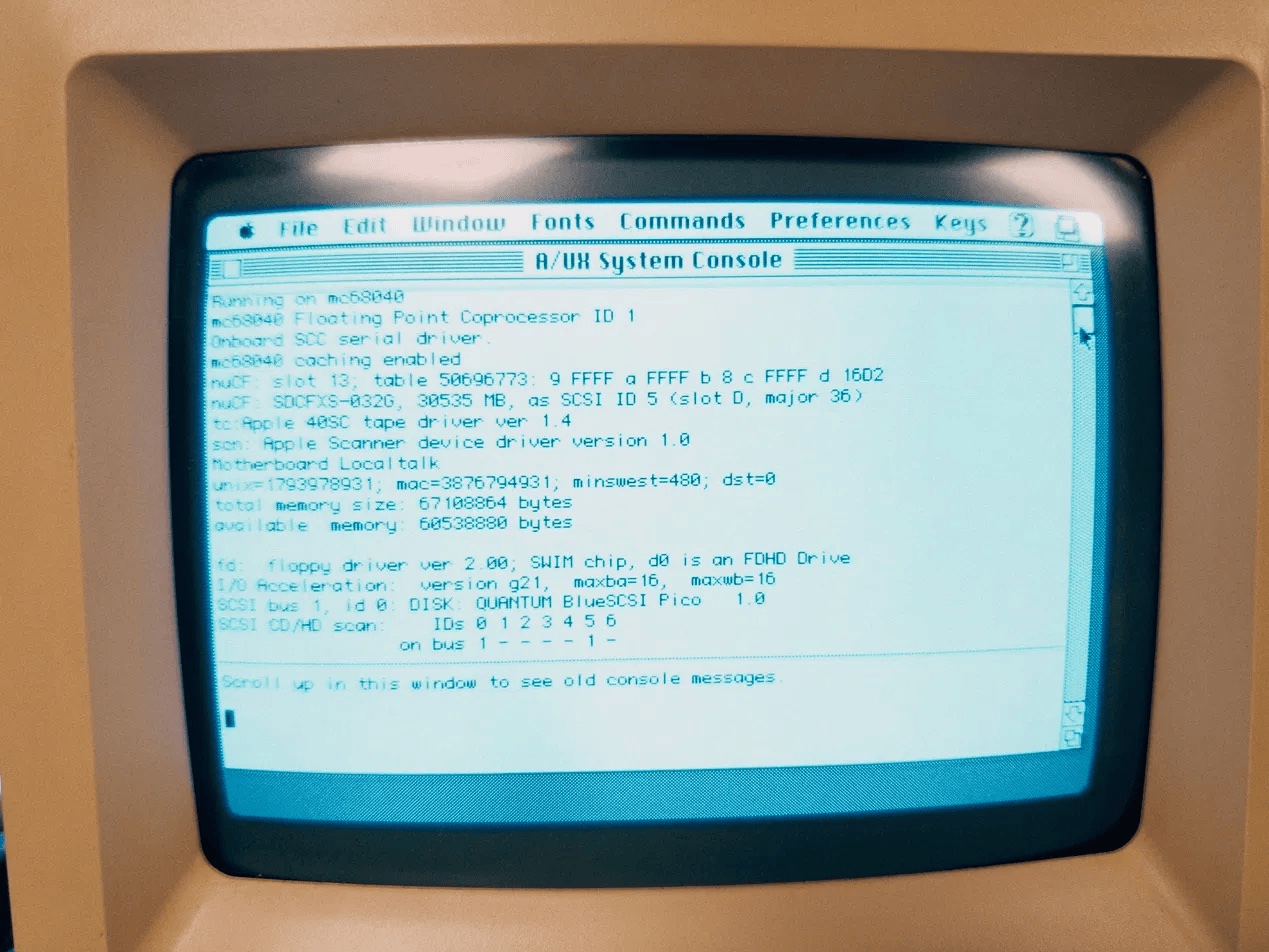
The A/UX kernel on the real SE/30 finding the card: a 32 GB card (SDCFXS-032G) as SCSI ID 5, in slot $D.
Download
qemu-se30-nucf.tar.gz holds the SE/30 machine and the nuCF card for QEMU v11.1.2:
patches/0001-0006- the SE/30 machine (shared with the Carrera040 patch set)patches/0201- the nuCF devicepatches/0202- fits it to the SE/30:-M macse30,nucf-rom=FILE[,nucf-slot=9..13](default 13, slot $D)build.sh,README.mdand thetools/for driving a headless session
tar xzf qemu-se30-nucf.tar.gz
cd qemu-se30-nucf
./build.sh                  # headless; --gui for a display window
The nuCF and Carrera040 sets can be used separately or together. The shared patches are identical, and build.sh applies each patch only once:
tar xzf qemu-se30-carrera040.tar.gz
tar xzf qemu-se30-nucf.tar.gz
cp qemu-se30-nucf/patches/*.patch qemu-se30-carrera040/patches/
cd qemu-se30-carrera040 && ./build.sh
Or, if one set is already built, run the other’s build.sh --src on the same QEMU checkout. Patches it already has are skipped.
You need to supply the SE/30 ROM, the SE/30 video declaration ROM (se30-video.rom, in a directory given with -L) and the nuCF’s declaration ROM:
cp tools/pram32.bin pram.bin
qemu-build/qemu-system-m68k -M macse30,nucf-rom=nucf.rom -m 64 \
    -bios se30.rom -L romdir -display none \
    -monitor unix:mon.sock,server,nowait \
    -drive if=ide,index=0,format=raw,file=cf.img \
    -drive if=mtd,format=raw,file=pram.bin
NUCF_DEBUG=1 traces every task-file access on stderr, which is the quickest way to see what a driver is asking the card.